Jump Pads: Difference between revisions
No edit summary Tags: Mobile edit Mobile web edit |
Tags: Mobile edit Mobile web edit |
||
| (8 intermediate revisions by 4 users not shown) | |||
| Line 2: | Line 2: | ||
[[File:Fight or flight engineer (1).png|512px|thumb|alt=The image promoting the Fight or Flight update. It shows the BLU Engineer having the time of his life.|The BLU Engineer is having the time of his life.]] | [[File:Fight or flight engineer (1).png|512px|thumb|alt=The image promoting the Fight or Flight update. It shows the BLU Engineer having the time of his life.|The BLU Engineer is having the time of his life.]] | ||
'''Jump Pads''' are a type of building in ''[[Team Fortress 2 Classic]]'' that can be constructed by the [[Engineer]] class using the [[Construction PDA|PDA: Jump Pad]]. They were added in the [[Fight or Flight]] Update and replaced the Engineer's ability to build a [[Teleporter]]. It is a circular, team-colored pad with an electronic fan covered by a metallic guard that constantly blows a current of air. It also emits team-colored wind particles, a team-colored glow, and a constant whirring noise while active. As opposed to the other buildings, the [[Engineer]] can construct up to two Jump Pads, named '''Jump Pad A''' & '''Jump Pad B''', that work independently of each other. When an ally presses the jump button while above a Jump Pad, that player's jump is given increased height and distance, similar to that of a "perfect rocket jump." | '''Jump Pads''' are a type of building in ''[[Team Fortress 2 Classic]]'' that can be constructed by the [[Engineer]] class using the [[Construction PDA|PDA: Jump Pad]]. They were added in the [[Fight or Flight]] Update and replaced the Engineer's ability to build a [[Teleporter]]. It is a circular, team-colored pad with an electronic fan covered by a metallic guard that constantly blows a current of air. It also emits team-colored wind particles, a team-colored glow, and a constant whirring noise while active. As opposed to the other buildings, the [[Engineer]] can construct up to two Jump Pads, named '''Jump Pad A''' & '''Jump Pad B''', that work independently of each other. When an ally presses the jump button while above a Jump Pad, that player's jump is given increased height and distance, similar to that of a "perfect rocket jump." The specific distance is 370 Hammer Units and 390 when crouch-jumping | ||
The Engineer's voice lines related to the Jump Pad were provided by [https://www.getgianni.com/ Gianni Matragrano].<!--Despite this, he has not yet put Team Fortress 2 Classic in his portfolio.--> | The Engineer's voice lines related to the Jump Pad were provided by [https://www.getgianni.com/ Gianni Matragrano].<!--Despite this, he has not yet put Team Fortress 2 Classic in his portfolio.--> | ||
| Line 23: | Line 23: | ||
=== Operation === | === Operation === | ||
When an ally presses the jump button above a Jump Pad, the player's jump height and distance are increased. The user's momentum depends on the momentum they had beforehand. A player can still walk or jump onto a Jump Pad without receiving the boost. The Jump Pad itself is solid, and players are slightly elevated while walking on top of it. Enemies can walk on top of the Jump Pad, but jumping on it only produces a standard jump. The [[Spy]] can use Jump Pads belonging to any team, regardless of whether he is disguised. | When an ally presses the jump button above a Jump Pad, the player's jump height and distance are increased. By just jumping, a player can go 370 Hammer Units vertically. By crouch-jumping, a player can go 390 Hammer Units vertically. The user's momentum depends on the momentum they had beforehand. A player can still walk or jump onto a Jump Pad without receiving the boost. The Jump Pad itself is solid, and players are slightly elevated while walking on top of it. Enemies can walk on top of the Jump Pad, but jumping on it only produces a standard jump. The [[Spy]] can use Jump Pads belonging to any team, regardless of whether he is disguised. | ||
Compared to the Teleporter, the cooldown on the Jump Pad is significantly shorter, so players are able to use it in short succession. The cooldown is per-user and not per Jump Pad, meaning multiple users will not affect each other's usage, and using two Jump Pads will not circumvent the user's own cooldown. If the user is on two Jump Pads at once, the animation plays on the one the user walked on first. The Jump Pad also works even in situations where the user wouldn't be able to jump, such as while crouching, while the [[Heavy]] has his minigun revved up, or while in the middle of a jump; however, it will not work while taunting. The user can continually hold the jump button to receive the Jump Pad boost. The user also does not suffer fall damage from the boost. | Compared to the Teleporter, the cooldown on the Jump Pad is significantly shorter, so players are able to use it in short succession. The cooldown is per-user and not per Jump Pad, meaning multiple users will not affect each other's usage, and using two Jump Pads will not circumvent the user's own cooldown. If the user is on two Jump Pads at once, the animation plays on the one the user walked on first. The Jump Pad also works even in situations where the user wouldn't be able to jump, such as while crouching, while the [[Heavy]] has his minigun revved up, or while in the middle of a jump; however, it will not work while taunting. The user can continually hold the jump button to receive the Jump Pad boost. The user also does not suffer fall damage from the boost. | ||
| Line 40: | Line 40: | ||
== Strategy == | == Strategy == | ||
The utility of the Jump Pad depends on the map and the circumstances of the team. While Teleporters enable faster movement to the frontlines, and the Jump Pad allows the Engineer to play a more versatile role, turning routes that require explosive jumps into routes that all mercenaries can traverse to. Jump Pads are also much easier to construct on the fly, a lot faster compared to Teleporters, and while initially more expensive, do not require upgrades. In addition, its ability to increase horizontal velocity partially fulfills the role of the Teleporter in getting teammates to the front lines quicker. In general, Jump Pads are more useful on defense than on offense, since the defenders are closer to their objective and therefore have little use for Teleporters. It is effective on small, open maps such as on [[Arena]] and [[King of the Hill]]. | The utility of the Jump Pad depends on the map and the circumstances of the team. While Teleporters enable faster movement to the frontlines, and the Jump Pad allows the Engineer to play a more versatile role, turning routes that require explosive jumps into routes that all mercenaries can traverse to. Jump Pads are also much easier to construct on the fly, a lot faster compared to Teleporters, and while initially more expensive, do not require upgrades. In addition, its ability to increase horizontal velocity partially fulfills the role of the Teleporter in getting teammates to the front lines quicker. In general, Jump Pads are more useful on defense than on offense, since the defenders are closer to their objective and therefore have little use for Teleporters. It is effective on small, open maps such as on [[Arena]] and [[King of the Hill]]. | ||
{| class="wikitable" style="text-align:center;" | |||
|+ style="text-align:center;"| Jump Pad v. Stock Teleporter | |||
|- style="text-align:left;" | |||
| <poem> | |||
➕ Uses less metal to construct and to upgrade | |||
➕ Provides verticality to all classes without fearing for fall damage | |||
➕ Does not have recharge and can be used simultaneously by allies | |||
➕️ Only one of the two Jump Pads deployed can be sapped at the same time. | |||
</poem> | |||
| <poem> | |||
➖ Has less health | |||
➖ Has limited distance covered | |||
➖ Enemy Spies can still use it | |||
</poem> | |||
|} | |||
== Stomping == | == Stomping == | ||
:''Not to be confused with the <code>stomp</code> console command.'' | :''Not to be confused with the <code>stomp</code> console command.'' | ||
If a player lands on an enemy while in the middle of a jump, they will deal significant damage to that enemy and play a "stomp" sound effect. The damage dealt uses the formula < | If a player lands on an enemy while in the middle of a jump, they will deal significant damage to that enemy and play a "stomp" sound effect. The damage dealt uses the formula <math>10 + \text{fall damage} \times 3</math>. The Jump Pad's power is not high enough to stomp an enemy at an equal level with it, so the user must gain more height during the jump or have the Jump Pad built above the enemy. | ||
== Medieval Mode == | == Medieval Mode == | ||
| Line 63: | Line 78: | ||
== Update history == | == Update history == | ||
{{Update history| | {{Update history| | ||
{{Update|2.1.0}} | |||
* Added the Jump Pad. | * Added the Jump Pad. | ||
** New [[Engineer]] voicelines by [https://twitter.com/GetGianni Gianni Matragrano]. | ** New [[Engineer]] voicelines by [https://twitter.com/GetGianni Gianni Matragrano]. | ||
{{Update|2.1.1}} | |||
* Fixed missing particle when landing from a jump pad as a global [[Disguise Kit|disguise]] Spy. | * Fixed missing particle when landing from a jump pad as a global [[Disguise Kit|disguise]] Spy. | ||
{{Update|2.1.4}} | |||
* Updated Jump Pads: | * Updated Jump Pads: | ||
** Jump Pads are now fully client predicted and consistent on any ping (Wonderland_War) | ** Jump Pads are now fully client predicted and consistent on any ping (Wonderland_War) | ||
** Can now be built in Medieval Mode | ** Can now be built in Medieval Mode | ||
{{Update|2.1.5}} | |||
* Increased jump height impulse to 770 (from 750) | * Increased jump height impulse to 770 (from 750) | ||
** This addresses some inconsistencies introduced in 2.1.4 | ** This addresses some inconsistencies introduced in 2.1.4 | ||
| Line 91: | Line 106: | ||
== Gallery == | == Gallery == | ||
<gallery> | <gallery> | ||
File: | File:concept_jump_pad.png|Concept art by {{Dev|Square}} | ||
File:concept_jump_pad_2.png|Concept art by {{Dev|Drudlyclean the Skeledude}} and {{Dev|Square}} | |||
2.0.3_sneak_peek.jpg|A teaser image from the official ''TF2C'' Twitter account, before the Jump Pad was announced. | 2.0.3_sneak_peek.jpg|A teaser image from the official ''TF2C'' Twitter account, before the Jump Pad was announced. | ||
Engie jump.jpg|A teaser image from the 2.0.3 patch notes, before the Jump Pad was announced. | Engie jump.jpg|A teaser image from the 2.0.3 patch notes, before the Jump Pad was announced. | ||
Latest revision as of 15:17, 25 August 2026
Jump Pad promotional blurbEngineers can now switch out their Teleporters for two Jump Pads! Instead of being disassembled and reassembled on the atomic level, teammates can super-jump into battle, covering the same kind of height and distance you'd expect from a perfect rocket jump. One-way drops are now two-way opportunities, explosive jumpers' shortcuts are now valid flank routes, and "I can't focus on keeping my Teleporters up!" is now a piss-poor excuse not to play Engineer.

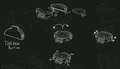
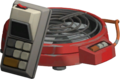
Jump Pads are a type of building in Team Fortress 2 Classic that can be constructed by the Engineer class using the PDA: Jump Pad. They were added in the Fight or Flight Update and replaced the Engineer's ability to build a Teleporter. It is a circular, team-colored pad with an electronic fan covered by a metallic guard that constantly blows a current of air. It also emits team-colored wind particles, a team-colored glow, and a constant whirring noise while active. As opposed to the other buildings, the Engineer can construct up to two Jump Pads, named Jump Pad A & Jump Pad B, that work independently of each other. When an ally presses the jump button while above a Jump Pad, that player's jump is given increased height and distance, similar to that of a "perfect rocket jump." The specific distance is 370 Hammer Units and 390 when crouch-jumping
The Engineer's voice lines related to the Jump Pad were provided by Gianni Matragrano.
Functionalities

Placement
Each Jump Pad requires 100 metal to build and cannot be upgraded unlike the Teleporter.
The Jump Pads' blueprints can be rotated by clicking the Engineer's secondary attack button (default key: MOUSE2), although this has no effect on gameplay.
They can be placed in deep water, but will not function, showing a message saying they are flooded. If they are constructed in shallow water, they will function as normal. A Jump Pad cannot be placed on an objective, such as the control point.
Construction

Once placed, a Jump Pad goes through a construction animation during which the building's health increases, reaching completion at 90 health. When completed, it is ready to use. It has shorter construction time than a Teleporter.
Hitting a Jump Pad with the Wrench will speed up construction as usual on Engineer's buildings.
Operation
When an ally presses the jump button above a Jump Pad, the player's jump height and distance are increased. By just jumping, a player can go 370 Hammer Units vertically. By crouch-jumping, a player can go 390 Hammer Units vertically. The user's momentum depends on the momentum they had beforehand. A player can still walk or jump onto a Jump Pad without receiving the boost. The Jump Pad itself is solid, and players are slightly elevated while walking on top of it. Enemies can walk on top of the Jump Pad, but jumping on it only produces a standard jump. The Spy can use Jump Pads belonging to any team, regardless of whether he is disguised.
Compared to the Teleporter, the cooldown on the Jump Pad is significantly shorter, so players are able to use it in short succession. The cooldown is per-user and not per Jump Pad, meaning multiple users will not affect each other's usage, and using two Jump Pads will not circumvent the user's own cooldown. If the user is on two Jump Pads at once, the animation plays on the one the user walked on first. The Jump Pad also works even in situations where the user wouldn't be able to jump, such as while crouching, while the Heavy has his minigun revved up, or while in the middle of a jump; however, it will not work while taunting. The user can continually hold the jump button to receive the Jump Pad boost. The user also does not suffer fall damage from the boost.
A counter on the HUD tells the builder how many players, including the builder, have used it to jump.
In addition, users of the Jump Pad who are on fire will have their afterburn extinguished.
Destruction
Jump Pads are destroyed when accumulated damage received by either end reduces the Teleporter health to zero. A destroyed Jump Pad leaves 4 unique gibs, with each leaving 8 metal (for a total of 32 metal worth of scrap) on the ground, which can be collected by allies/enemies for metal and/or ammo.
Sapping
When one Jump Pad is sapped, the other Jump Pad is unaffected. Any friendly Engineers can remove the Sapper by destroying the Sapper on a Jump Pad. Friendly Engineers may then proceed to repair either or both ends of the Jump Pad by using his Wrench. However, since the Spy can place an infinite number of Sappers on a Jump Pad, an Engineer may not be able to fully repair it before another Sapper is placed upon it. This results in the Jump Pad being destroyed quickly with its 90 health unless the Spy is disposed of.
Strategy
The utility of the Jump Pad depends on the map and the circumstances of the team. While Teleporters enable faster movement to the frontlines, and the Jump Pad allows the Engineer to play a more versatile role, turning routes that require explosive jumps into routes that all mercenaries can traverse to. Jump Pads are also much easier to construct on the fly, a lot faster compared to Teleporters, and while initially more expensive, do not require upgrades. In addition, its ability to increase horizontal velocity partially fulfills the role of the Teleporter in getting teammates to the front lines quicker. In general, Jump Pads are more useful on defense than on offense, since the defenders are closer to their objective and therefore have little use for Teleporters. It is effective on small, open maps such as on Arena and King of the Hill.
➕ Uses less metal to construct and to upgrade |
➖ Has less health |
Stomping
- Not to be confused with the
stompconsole command.
If a player lands on an enemy while in the middle of a jump, they will deal significant damage to that enemy and play a "stomp" sound effect. The damage dealt uses the formula . The Jump Pad's power is not high enough to stomp an enemy at an equal level with it, so the user must gain more height during the jump or have the Jump Pad built above the enemy.
Medieval Mode
The Engineer has access to Jump Pads on Medieval Mode since version 2.1.4, which is the only building allowed to deploy. However, there are following differences in this mode:
- When pressing the Construction PDA (Default key:
4), the Engineer omits the Construction PDA and instead equips the Jump Pad-containing toolbox.- Without the said PDA, he cannot choose which Jump Pad he will deploy first. He can only instead deploy Jump Pad A first, then Jump Pad B.
- He cannot use the Destruction PDA to manually destroy a Jump Pad, but the Jump Pad furthest away from the player will be destroyed if both Jump Pads are built while attempting to build another.
Related Achievements
| Achievement | Description | |
|---|---|---|

|
Terminal Velocity | Kill someone by landing on them after using a Jump Pad. |

|
Skyfall | Get a backstab kill shortly after using an enemy Jump Pad. |

|
Fan the Flames | Extinguish yourself with a Jump Pad. |

|
Fan Service | Have other players use your Jump Pads 1,000 times. |

|
Jumpstarter | Have teammates get 20 kills shortly after using your Jump Pads. |

|
Out of Circulation | Destroy 40 Jump Pads. |
Update history
- Added the Jump Pad.
- New Engineer voicelines by Gianni Matragrano.
- Fixed missing particle when landing from a jump pad as a global disguise Spy.
- Updated Jump Pads:
- Jump Pads are now fully client predicted and consistent on any ping (Wonderland_War)
- Can now be built in Medieval Mode
- Increased jump height impulse to 770 (from 750)
- This addresses some inconsistencies introduced in 2.1.4
- If both Jump Pads have been built in Medieval Mode, attempting to build another now destroys the Jump Pad that is the farthest away from the player
Trivia
- The description for the Jump Pad included the phrase, "To air is human". This is a pun on the saying "To err is human; to forgive, divine", and is attributed to the English poet Alexander Pope.
- As shown in the Fight or Flight promotional image, a thrown Sandvich will be launched by the Jump Pad. The throw trajectory of it is still considered for its launch.
- The Fight or Flight promotional image shows a RED Engineer sitting on a Teleporter, with a second Teleporter right next to him. Logically, if both Teleporters belong to that Engineer, they should be active and teleporting him.
- If an enemy Spy kills an Engineer by stomping on him after using his own Jump Pad, the Engineer will get credit for his own death.
Comparison from Team Fortress 2
- The stomping mechanics are based on Mantreads and Thermal Thruster of live TF2.
Gallery
-
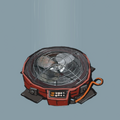 Concept art by
 Square
 -
-
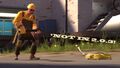 A teaser image from the official TF2C Twitter account, before the Jump Pad was announced.
 -
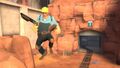 A teaser image from the 2.0.3 patch notes, before the Jump Pad was announced.
 -
Jump Pad construction animation
-
 PDA: Jump Pad backpack icon
 -
 Jump Pad stomp kill icon


